CopyCop: AI-Powered UX Writing Tool for Figma
From problem to product enabling better microcopy at scale. Improved prototyping speed by 80%.
Disclaimer: Some details in this case study may be vague to protect client IP under NDA.
The Problem
UX copy had no clear owner
In our product lifecycle, UX microcopy fell into the gap between PMs (focused on logic) and designers (focused on layout). Everyone touched it; nobody owned it.
So, the idea was to use AI to automate the process...
Solution
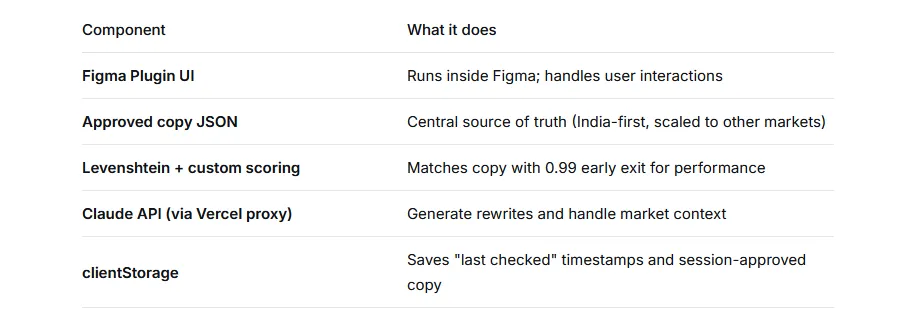
I built an AI-native Figma plugin that writes and validates UX copy against Branch's human-approved database while offering on-demand, brand-compliant rewrites eliminating the context-switching between Figma, Claude, and ChatGPT.
Impact
60% faster design -> prototyping
Project Details
-
Role
Product Designer / AI Design Lead -
Company
Branch.co -
Tools
Figma Plugin API, Claude API, Vercel, Levenshtein Algorithm -
Duration
5 Weeks
The Real Friction
The back-and-forth that killed flow state
A designer working on a flow would: select text in Figma → switch to Claude → paste text → wait → copy suggestion → switch back → paste → repeat 20+ times per screen. That back-and-forth destroyed concentration.
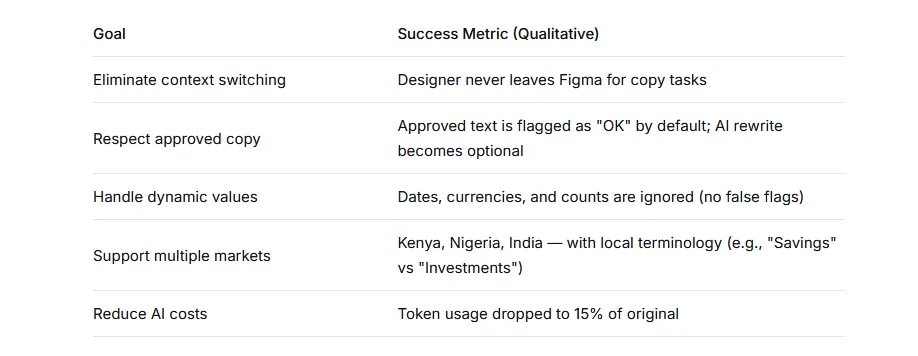
Worse, we had invested months building a human-approved master copy database. But Claude would rewrite even the approved copy, defeating the entire purpose of a single source of truth.
"We needed a companion, not a replacement."
The Solution
I Vibe Coded an AI plugin to fix this
A designer working on a flow would: select text in Figma → switch to Claude (custom copyGPT) → paste text → wait → copy suggestion → switch back → paste → repeat 20+ times per screen. That back-and-forth destroyed concentration.
Worse, we had invested months building a human-approved master copy database. But Claude would rewrite even the approved copy, defeating the entire purpose of a single source of truth.
Goals & Success Criteria
The User Journey
How It Works
Mode 1: Check Copy 1 (Figma Layers)
Useful for design hand-off to check if all copy in a design is approved
- Launch the plugin → Select a frame or text layer on the canvas.
- Tap "Check Copy" → Plugin scans selection against the approved JSON database.
- Dashboard appears: ✅ Matched (approved) · ⚠️ To Review (close match) · ❌ Missing (new copy)
- For missing or close matches: Claude generates 3 options respecting brand tone, market context, and guidelines.
- Tap to apply — text updates instantly in Figma.
- Applied copy is auto-added to the approved database (session-only or persisted via JSON).
Mode 1: Check Copy 2 - Upload a screenshot
Checks an image for a quick clarification eg during meetings/peer reviews
Special behaviour: Dynamic values (e.g., "Pay in 1 day" vs "Pay in 5 days") are automatically ignored to prevent false flags using a regex pattern.
Mode 2: Write Copy 1
Rewrites any selected copy on any all figma frames or layer. Useful for multiple screens/texts rewriting
- Option A: Type or paste raw copy into the plugin's text field → Get 3 AI-generated rewrites instantly.
- Option B: Select existing text on canvas → Tap "Rewrite Selected" → Get 3 options inline.
- Option C: Select existing text → Tap "Improve Tone" → Get 3 tone-adjusted variants.
Each rewrite is: Market-aware (Kenya = "M-Pesa", India = "UPI") · Tone-compliant (British English, plain language) · Free of blacklisted patterns.
Mode 2: Check Copy 2 - Write full Frames
Rewrites any frame(s) that is selected on a Figma canvas. Generates 3 options each and designer can select & apply
Technical Architecture
From 20,000 tokens to 340
Key optimisation: I reduced token size from ~20,000 to ~340 while preserving brand tone using a compressed system prompt + ephemeral caching. This reduced API costs by ~98% per validation call.
Challenge Deep-Dive
The hard engineering problems
CHALLENGE 1
"Your copy is approved, but AI wants to change it"
Symptom: Even perfectly good approved copy was being flagged as "needs improvement" because Claude didn't know it was approved.
Solution: Two-phase validation — local exact match against JSON (no AI cost), and only if unmatched, call Claude for suggestions.
CHALLENGE 2
Dynamic numbers, dates, and currencies
Symptom: "Pay your loan in 1 day" and "Pay your loan in 5 days" triggered false mismatches.
Solution: Regex-based dynamic value detection. Any text matching the pattern passes automatically — no false flags.
CHALLENGE 3
Manual copy persistence
Symptom: Designers wanted to save new approved copy without editing raw JSON.
Current solution: Session-only approval with a visible warning. Future: Remote Vercel endpoint to write back to the central DB.
Outcome
Results & Impact
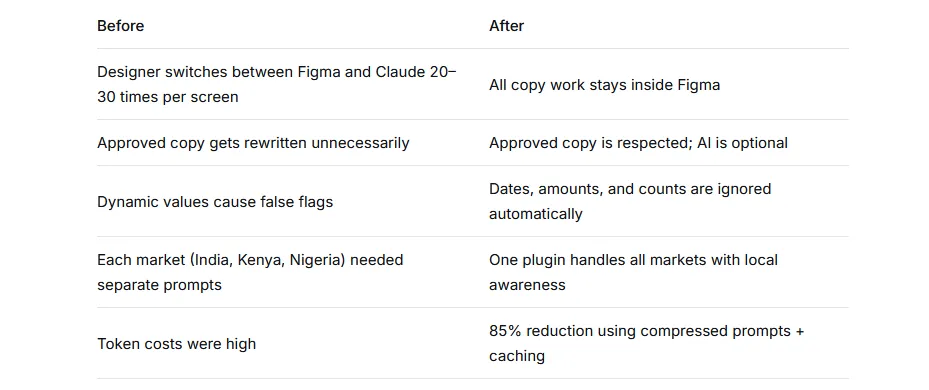
"I don't have to 'convince' the AI anymore. If the copy is already approved, it just works. And when I need a rewrite, it's right there." — Designer feedback
Retrospective
What I'd do differently
Remote DB sync — Right now, approved copy is session-only unless manually added to JSON. A small Vercel endpoint would solve this permanently.
Batch approval UI — For bulk-adding copied text to the master DB without editing JSON manually.
Usage analytics — To track how many rewrites are actually applied vs. ignored, which helps tune the model further and build the business case for wider rollout.
Learnings & Bloopers
We tried ChatGPT first (Shout out to Olumide!)
We built a custom GPT trained on our screens and tone. But it hallucinated unpredictably. The dreaded double dash made every output look AI-generated, and it frequently violated our own guidelines (e.g., using "click" instead of "tap").
We switched to Claude.
Claude had better discipline, larger context window. But a new problem emerged: Claude would rewrite even approved copy, defeating our single source of truth.